

.webp?language=en-US)



by Joseph R. Favour, ASLA
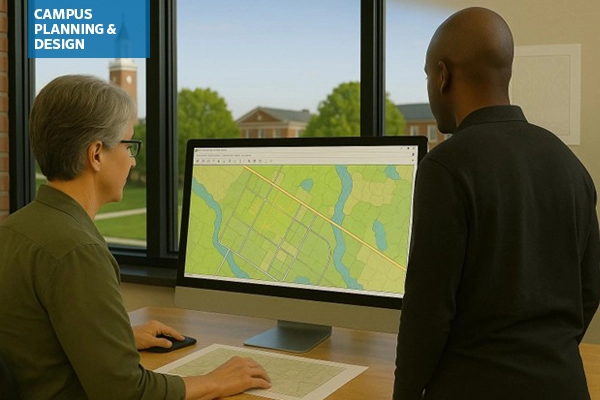
ASLA's Campus Planning & Design Professional Practice Network (PPN) held a Zoom Coffee Chat in late May where members shared how they are currently using artificial intelligence (AI) and digital tools in their professional workflows and discussed both the opportunities and limitations these technologies present. The conversation highlighted a mix of practical applications, exploratory efforts, and ongoing questions around how best to integrate AI into landscape architecture practice.
Many members reported using AI tools to assist with writing, editing, and documentation tasks. ChatGPT was frequently cited for its ability to rework and condense text, particularly in drafting and editing reports. Tools like Copilot and Fathom are also being used to streamline meeting note-taking, summarize conversations, and produce draft documentation. These tools help ease the burden of early-stage writing and are valued for improving productivity.
In visual and design workflows, AI is increasingly used in Photoshop for tasks like inserting entourage into renderings. Users described being able to quickly add benches, trees, or figures by selecting areas and prompting the tool with simple commands. Interns and younger staff are also introducing AI-enabled graphics tools from their academic work, such as platforms that generate schematic design images based on uploaded site photos and user prompts.
Some firms have taken AI integration further by developing internal tools, such as a proprietary chatbot trained only on their in-house design and construction standards. Unlike public tools that draw from a vast pool of external data, these custom bots provide targeted support while minimizing risk and confusion. While the setup required programming expertise, participants noted it was relatively straightforward to implement in-house.
Across these examples, AI was seen as useful for generating a “first pass”—whether for reports, renderings, or concepts—that could then be refined by designers. This was particularly valuable in overcoming creative blocks or producing multiple options during the early stages of design.
Looking ahead, members expressed interest in expanding AI’s role in areas like contract writing, product sourcing, and sustainability-focused decision-making. For example, AI could potentially support sourcing local materials based on environmental goals or help identify product options—such as playground swings—more quickly at the outset of a project. Others noted that campus landscape architects could benefit from AI-generated dashboards to monitor long-term trends in water use, fertilizers, or other maintenance metrics. Tools like Ladybug for Rhino were mentioned as promising examples, especially for site analysis and energy modeling.
However, several barriers to broader AI adoption were identified. Participants noted the sheer volume of new tools makes it difficult to evaluate what’s useful or trustworthy. Cost, lack of time, and uncertainty about return on investment were commonly cited concerns. Many were also unaware of existing AI plugins for tools they already use, such as Revit or AutoCAD. Firm-level policies and client privacy protocols can also limit AI use, particularly when data sensitivity or NDAs are involved.
Some limitations were more technical in nature—for instance, Photoshop’s generative AI lacks the specificity needed for certain tasks, such as applying exact campus-standard furnishings or materials. Others felt that available tools were either too general or not flexible enough for detailed professional workflows.
In sum, the discussion reflected both optimism and caution. While AI is already proving helpful in multiple aspects of landscape architecture, members agreed that more peer-to-peer learning and clearer guidance will be essential to unlock its full potential in practice.
To aid in understanding what is out there and how it could be used in campus planning and design tasks, I used multiple online tools and resources to generate the following list of tools to consider for your toolbox of the future:
Tools for Planning & Analysis
For Use with GIS (Geographic Information Systems)
A. Design + Visualization Tools Compatible with ArcGIS
1. Rhino + Grasshopper with Elk or Heron Plugins
Use: Parametric design and terrain modeling using GIS data.
Why it pairs well: You can import shapefiles or DEMs from ArcGIS and use Grasshopper for site-responsive design. Bonus: Add plugins like Ladybug for climate-aware design.
Heron Link Elk Link2. SketchUp + ArcGIS for SketchUp
Use: 3D modeling of campus environments using geolocated GIS data.
Why it pairs well: SketchUp Pro’s ArcGIS plugin allows seamless import of basemaps and terrain for early-stage visualization.
How to visualize SketchUp models in ArcGIS SketchUp Link3. ArcGIS CityEngine
Use: 3D city-scale modeling and procedural design.
Why it pairs well: Direct Esri integration; useful for campus master plans, growth scenarios, and stakeholder engagement with interactive 3D models.
Overview of CityEngine at EsriB. AI + Automation Tools for Use with ArcGIS
1. ChatGPT + ArcGIS Notebooks
Use: Automate map report writing, code explanation, and generating Python scripts for geoprocessing.
Why it pairs well: ArcGIS Notebooks support Python, which works seamlessly with ChatGPT for scripting tasks (e.g., batch geocoding, spatial joins).
How to integrate ChatGPT with ArcGIS ChatGPT Link2. Google Earth Engine
Use: Analyze large-scale environmental data (vegetation, urban heat islands, hydrology) with campus overlays.
Why it pairs well: Combine ArcGIS shapefiles with satellite imagery and machine learning classifiers.
Overview of how to use Google Earth Engine with ArcGIS and QGIS Google Earth Engine Link3. Pix4D / DroneDeploy/ FlytBase
Use: Drone-based site scanning with orthomosaics or elevation models exported to ArcGIS.
Why it pairs well: Automate mapping, topo analysis, vegetation health, or construction monitoring.
Overview of using drones for surveying and mapping Integrating drone data in ArcGIS Pix4D Link DroneDeploy Link FlyteBase LinkC. Scenario Planning + Data Modeling
1. Urban Footprint or CommunityViz (new release coming in 2025 for ArcGIS Pro)
Use: Scenario planning for land use, transportation, emissions, and equity outcomes.
Why it pairs well: Import GIS layers from ArcGIS; simulate future campus growth or green infrastructure strategies.
Overview of planning workflows with Urban Footprint software CommunityViz Link Urban Footprint Link2. Esri GeoAI (AI + Deep Learning tools in ArcGIS Pro)
Use: Detect features in imagery (e.g., tree canopies, impervious surfaces), predict risk zones, or analyze behavior patterns.
Why it pairs well: Built into ArcGIS ecosystem; useful for spatial prediction or automated feature extraction.
GeoAI overviewD. Campus-Specific Sustainability + Green Infrastructure Tools
1. i-Tree Tools (e.g., i-Tree Canopy, Landscape, Hydro)
Use: Assess ecological value of trees, carbon sequestration, stormwater interception.
Why it pairs well: Outputs can be visualized and analyzed in ArcGIS for spatial planning and investment decisions.
i-Tree quick guide i-Tree Tools Link2. InfraWorks (Autodesk)
Use: Design scenarios for roads, green infrastructure, and topography with GIS integration.
Why it pairs well: Imports GIS data for terrain, parcels, and context modeling; great for infrastructure alignment.
Overview of InfraWorksE. Bonus: Automation and Data Interoperability
FME (Feature Manipulation Engine)
Automates data conversion between ArcGIS, CAD, BIM, and 3D platforms.
FME LinkModelBuilder (ArcGIS Pro)
Automates repeat GIS workflows without coding.
ModelBuilder workflow automationArcPy with Jupyter Notebooks / Python APIs
Custom AI or geospatial analysis with ArcPy or open-source libraries (scikit-learn, TensorFlow).
ArcPy overview Jupyter Notebooks ArcPy/Python API resourcesFor Use with AutoCAD / Civil 3D
A. Twinmotion or Lumion (Real-Time Visualization)
What it does: Renders 3D models from AutoCAD/Civil 3D for presentations and stakeholder engagement.
Why it's valuable: Easy to link or import Civil 3D models. Great for creating realistic visuals or flythroughs of proposed campus projects. Use example: Showing phased campus development or landscape transitions in 3D.
Twinmotion Link Lumion Link Comparision of Twinmotion and LumionB. Autodesk InfraWorks
Tool for context-aware planning and conceptual design, especially useful for large-scale sites like college campuses.
It integrates well with AutoCAD, Civil 3D, and GIS data, making it highly valuable for landscape architects working on campus master plans, infrastructure layout, or scenario visualization.
Design Techniques with InfraWorks InfraWorks LinkFor Use with Rhino + Grasshopper
A. Ladybug Tools (Ladybug + Honeybee + Dragonfly)
Environmental and climate analysis suite for Grasshopper
What it does: Analyzes sun, shade, wind, energy use, daylighting, and urban microclimates using real-world data.
Why it’s valuable: Helps site buildings and open spaces more sustainably. Understands campus microclimates for tree planting, shade structures, and comfort zones. Use example: Optimize open space orientation, shade structures, or thermal comfort zones using local climate data. Cost: Free and open-source
Ladybug Tools LinkB. Galapagos + Wallacei
Evolutionary solvers for multi-objective optimization in Grasshopper
What it does: Runs generative algorithms to explore best design outcomes across many variables.
Why it’s valuable: Allows landscape architects to test hundreds of layout or grading schemes for factors like accessibility, views, tree retention, and connectivity. Use example: Optimizing path networks through a campus green to balance walkability, slope, and planting retention. Cost: Included with Grasshopper (Galapagos); Wallacei is free.
Galapagos (Grasshopper) Link Wallacei LinkRevit / BIM (Building Information Modeling)
A. Rhino.Inside.Revit
Seamless parametric design integration
What it does: Embeds Rhino and Grasshopper directly into Revit.
Why it’s valuable: Brings generative and parametric modeling into BIM workflows. Enables fluid coordination between complex site geometry and Revit elements. Use example: Designing a campus plaza with complex paving patterns and grading that dynamically updates with architectural models. Cost: Free plugin (requires Rhino license)
Rhino.Inside.Revit LinkB. ArcGIS GeoBIM
GIS + BIM integration for campus-scale context
What it does: Links Revit models with ArcGIS geospatial data.
Why it’s valuable: Allows viewing and querying BIM models in geographic context. Great for large campus or district-wide planning and infrastructure coordination. Use example: Coordinating building projects with existing utilities, landscape features, and land use zones across a large campus. Cost: Requires both ArcGIS Online and Autodesk BIM Collaborate (licensed)
GeoBIM LinkTools for Sustainability & Performance Modeling
i-Tree Tools
- What it does: Analyzes tree canopy and quantifies ecosystem services like carbon sequestration, air quality improvement, and stormwater reduction.
- Why it’s valuable: Provides data to support tree preservation, planting strategies, and sustainability goals.
- Use example: Evaluate campus tree canopy to estimate carbon storage, stormwater benefits, and identify areas for new tree planting.
- Cost: Most i-Tree Tools are free
- i-Tree Tools Link
Climate Studio / Ladybug Tool
- What it does: Performs climate-based simulations—sunlight, shading, wind, and thermal comfort—using Rhino/Grasshopper.
- Why it’s valuable: Informs site design decisions based on daylight, heat, and wind patterns for improved comfort and energy performance.
- Use Example: Model sun exposure on walkways to guide tree placement and shading structures for outdoor comfort.
- Cost: Free and open-source
- Ladybug Tools Link
Storm Water Management Model (SWMM) / HydroCAD
- What it does: Models stormwater runoff, infiltration, and storage for urban drainage systems, including green infrastructure.
- Why it’s valuable: Helps design sustainable drainage solutions and meet stormwater regulations.
- Use Example: Simulate replacing a parking lot with a bioswale system to manage runoff and reduce flooding.
- SWMM is free to download and use, HydroCAD costs vary (see webpage)
- SWMM Link
- HydroCAD Link
AI & Automation Tools
ChatGPT / Claude / Gemini
- What they do: These large language models generate natural language text for a wide range of tasks, including writing, summarizing, translating, and ideation.
- Why they’re valuable: They streamline writing tasks such as drafting reports, code analysis, public meeting scripts, or project narratives. They also support brainstorming and organizing design thinking. Be careful to review their work, as they are not always 100% accurate.
- Use example: Use ChatGPT to draft a site analysis narrative and community engagement summary for a campus greenway proposal, including ADA accessibility considerations and alignment with sustainability guidelines.
- Cost: Varies, depending on service desired. Basic versions are generally free, but more powerful options require subscriptions.
- ChatGPT Link
- Claude Link
- Google Gemini Link
Midjourney / DALL·E / Image Generation Tools
- What they do: AI image generation tools that create realistic or artistic visuals from text prompts, ideal for producing conceptual illustrations and mood boards.
- Why they’re valuable: They help quickly convey design atmospheres, test visual ideas, and communicate vision before formal design development begins.
- Use example: Generate atmospheric renderings of a proposed outdoor learning garden with natural materials and native planting palettes to present during stakeholder engagement workshops.
- Cost: Varies. Some have free basic versions, but the most powerful tools generally require a subscription.
- Midjourney Link
- DALL·E Link
- Getting Started with Midjourney
Veras (by EvolveLAB)
- What it does: Veras uses AI to enhance 3D models with stylized, high-quality renderings directly from Revit, Rhino, Vectorworks, and/or SketchUp, using smart prompt inputs.
- Why it’s valuable: Saves time and increases visual impact of design presentations without exporting to separate rendering software. Great for rapid iterations and client feedback.
- Use example: Produce AI-enhanced renderings of a new student commons plaza from SketchUp massing models, with seasonal planting schemes and seating areas for inclusion in a design review package.
- Cost: Currently $51/year for one license
- Veras Link
Campus-Specific Management Platforms
OpenGov / Brightly / Cityworks
- What they do: These are government and infrastructure asset management platforms that support tracking, maintenance scheduling, budgeting, and GIS-integrated asset inventories for public works, parks, and landscapes.
- Why they’re valuable: They enable long-term planning for landscape and site assets by linking design intent to lifecycle management. Useful for aligning design with operations, and ensuring campus landscapes remain safe, functional, and well-maintained.
- Use example: Use Cityworks to map and manage the campus inventory of site furnishings, lighting, and pavement conditions, schedule regular inspections, and track maintenance tasks through GIS dashboards.
- Cost: Varies by platform
- OpenGov Link
- Brightly Link
- Trimble Cityworks Link
Irrigation Central Control (e.g., Rain Bird IQ4, Hunter Centrallus)
- What it does: Smart irrigation control systems that use real-time data (weather, soil moisture, plant types) to automate and optimize water delivery across large landscapes.
- Why it’s valuable: Supports water conservation and efficient irrigation scheduling, reduces overwatering and maintenance costs, and aligns with sustainability and resilience goals.
- Campus use example: Install IQ4 across campus to automate watering schedules based on rainfall data and soil sensors, ensuring native planting zones receive minimal irrigation while high-use lawn areas remain green and healthy.
- Cost: Varies, but most are subscriptions the need to create an account
- Rain Bird IQ4 Link
- Hunter Centrallus Link
ASLA Resources on AI
From the Professional Practice Networks: In 2024, the ASLA Digital Technology PPN distributed two surveys: one to learn how landscape architects are using artificial intelligence (AI) in their projects, receiving more than 300 responses, and one on software usage, with more than 350 responses. See The Field for recaps of the survey results:
- How Landscape Architects Are Incorporating Artificial Intelligence
- Insights from the 2024 ASLA Digital Technology Software Survey
- Related: the Canadian Society of Landscape Architects (CSLA)'s AI Network and 2023 survey on AI, also recapped in the 2025 issue of the Journal of Digital Landscape Architecture: "AI in Practice: Professional Survey Findings from Landscape Architects in North America."
- See all the Digital Technology PPN’s posts for The Field, including step-by-step tutorials on Midjourney.
From ASLA Online Learning:
- Artificial Intelligence: It’s in Your Firm (Whether You Know It or Not)
1.0 PDH (LA CES/non-HSW)
- ASLA SKILL | ED: Exploring AI's Impact on Landscape Architecture
- When 1 × 1 = ♾️: Design Ethics, Storytelling, and Collaboration with AI
1.25 PDH (LA CES/non-HSW) ASLA 2024 Conference Session Recording
- Generative Planting at Scale: Systems Design for Ecological Impact
1.25 PDH (LA CES/HSW)
ASLA 2024 Conference Session Recording
- A Future of Computational Collaborators: Machine Learning and Artificial Intelligence in Landscape Architecture
1.0 PDH (LA CES/non-HSW)
ASLA 2023 Conference Session Recording
From Landscape Architecture Magazine:
- "Topophyla’s Explorations in AI Head Down the Garden Path"
- "I, Designer?"
Advancements in artificial intelligence creativity should make us rethink the future of landscape architecture practice.
- "Live and Learn" Algorithms are bringing new kinds of evidence and predictive powers to the shaping of landscapes.
Joseph R. Favour, ASLA, is Associate Professor in Practice at the University of Minnesota and co-chair of ASLA's Campus Planning & Design Professional Practice Network (PPN). Joe has over 27 years of professional experience in both private practice and academia. His teaching and practice interests are focused on design and implementation, particularly the design of college campuses. Joe teaches design studios and landscape technology and systems courses, with expertise in earthwork grading, stormwater, and materials assembly. Joe maintains a limited practice in Minneapolis. He served as Head of the Landscape Architecture Department from 2014 to 2022 and as an Associate Professor in Practice since 2011. Prior to that Joe worked as an Adjunct Assistant Professor and a licensed landscape architect with several Minnesota firms.